
Le répertoire /proc
Sous Linux (UNIX) tout est fichier
Cela veut dire que tout est dans l’arborescence depuis la racine ! c’est la base de l’informatique
La variable $$
depuis un terminal on va obtenir le PID de se terminal , Process IDentifiant ! car le terminal lui même est un processus
bruno@elliott:~$ echo $$
9045
bruno@elliott:~$ ps
    PID TTY          TIME CMD
   9045 pts/2    00:00:00 bash
   9056 pts/2    00:00:00 ps
bruno@elliott:~$
$$ est une variable d’environnement qui nous donne le PID du processus en cours ici 9045
au passage avec ps (la fonction qui liste les processus , sans option c’est à partir de la ou nous sommes)
on notera que ps est aussi un processus lancé et oui il se voit lui même 9056
bruno@elliott:~$ ps
    PID TTY          TIME CMD
   9045 pts/2    00:00:00 bash
   9169 pts/2    00:00:00 ps
et normalement le kernel lui attribut un PID diffèrent .
Et ce qui est remarquable c’est qu’il existe que le temps qu’on l’utilise
Le répertoire /proc
Dans ce répertoire on y trouve tous les processus lancés et plus
le 1 !! est le init ou systemd , c’est le premier processus sur lequel tout s’appuie sur votre machine!
bruno@elliott:~$ cat /proc/1/cmdline
/sbin/initbruno@elliott:~$
ici nous c’est init!
bruno@elliott:~$ ls /proc/1/cmdline -l
-r--r--r-- 1 root root 0 10 sept. 09:04 /proc/1/cmdline
bruno@elliott:~$
on note ici que ce fichier n’est qu’en lecture , même pour ROOT !!
Ce sont des pseudos fichiers, ou des fichiers virtuels, qui n’existe que dans le kernel (et non pas sur le disque)
bruno@elliott:~$ cat /proc/9045/cmdline
bashbruno@elliott:~$
ce deuxième exemple permet de voir notre bash … a vous d’adapter a votre PID
cat /proc/$$/status
bruno@elliott:~$ cat /proc/$$/status
Name: bash
Umask: 0022
State: S (sleeping)
Tgid: 9045
Ngid: 0
Pid: 9045
PPid: 8487
TracerPid: 0
Uid: 1000 1000 1000 1000
Gid: 1000 1000 1000 1000
FDSize: 256
Groups: 4 20 24 25 27 29 30 33 44 46 100 101 104 106 112 114 117 126 1000
NStgid: 9045
NSpid: 9045
NSpgid: 9045
NSsid: 9045
VmPeak: 9996 kB
VmSize: 9836 kB
VmLck: 0 kB
VmPin: 0 kB
VmHWM: 6276 kB
VmRSS: 6272 kB
RssAnon: 1932 kB
RssFile: 4340 kB
RssShmem: 0 kB
VmData: 1948 kB
VmStk: 132 kB
VmExe: 772 kB
VmLib: 2288 kB
VmPTE: 56 kB
VmSwap: 0 kB
HugetlbPages: 0 kB
CoreDumping: 0
THP_enabled: 1
Threads: 1
SigQ: 0/63357
SigPnd: 0000000000000000
ShdPnd: 0000000000000000
SigBlk: 0000000000010000
SigIgn: 0000000000384004
SigCgt: 000000004b813efb
CapInh: 0000000000000000
CapPrm: 0000000000000000
CapEff: 0000000000000000
CapBnd: 000001ffffffffff
CapAmb: 0000000000000000
NoNewPrivs: 0
Seccomp: 0
Seccomp_filters: 0
Speculation_Store_Bypass: thread vulnerable
SpeculationIndirectBranch: conditional enabled
Cpus_allowed: f
Cpus_allowed_list: 0-3
Mems_allowed: 00000000,00000000,00000000,00000000,00000000,00000000,00000000,00000000,00000000,00000000,00000000,00000000,00000000,00000000,00000000,00000000,00000000,00000000,00000000,00000000,00000000,00000000,00000000,00000000,00000000,00000000,00000000,00000000,00000000,00000000,00000000,00000001
Mems_allowed_list: 0
voluntary_ctxt_switches: 494
nonvoluntary_ctxt_switches: 41
bruno@elliott:~$
Beaucoup trop d’infos !!et ça tue l’info , non ? 🙂
bruno@elliott:~$ cat /proc/$$/status | grep State
State:	S (sleeping)
bruno@elliott:~$
avec pipe (|) et grep on filtre que State
et on remarque que mon processus bash dors ! il attends une action ..
pour illustrer
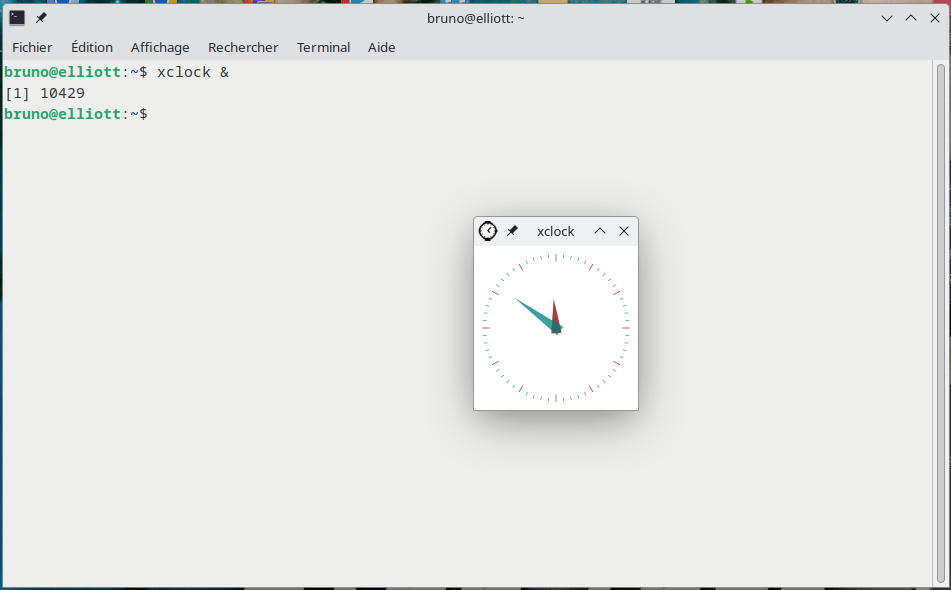
xcloxk est un petit utilitaire qui nous lance une pendule (fenêtre graphique)
on voit son PID qui est 10429
bruno@elliott:~$ kill -STOP 10429

[1]+  Stoppé                 xclock
bruno@elliott:~$ cat /proc/10429/status | grep State
State:	T (stopped)
bruno@elliott:~$
on peut relancer avec
kill -CONT 10429